Using Athena to query cloud trail logs is a common solution designed for mid to big-sized AWS environments. Typically an IT Platform team has enabled Cloudtrail to streamline all AWS audit logs towards a centralized bucket (for example: via ControlTower). Having data in one place is a nice thing, but finding the information you need in these terabytes of data is impossible without the help of a search engine like Athena.
The solution seems to come out of the box if you follow this official link from AWS:
Querying AWS CloudTrail logs - Amazon Athena
The solution will build a glue data table and applies the data format to it. This allows us to be able to search for cloud trail data. However, the burden of creating partitions is not taken from us. Athena queries are billed by processed data - which means you would wait extremely long and pay a lot for global queries. Partitions are helping the Athena engine to search only relevant files. In the case of Cloudtrail AWS has the following S3 object path strategy:
organization > accountId > region > year > month > day
This means we could partition our data based on the path above and tell Athena to search only in specific accounts/regions and based on time. Each partition must be maintained “manually” if you follow the AWS documentation. If you search for automation on the internet you will most probably fall over the following solutions:
- GorillaStack/athena-cloudtrail-partitioner: Automate the daily partitioning of your CloudTrail bucket in Athena (github.com)
- duo-labs/cloudtrail-partitioner (github.com)
- https://alsmola.medium.com/use-aws-glue-to-make-cloudtrail-parquet-partitions-c903470dc3e5
- Working with AWS CloudTrail Lake - AWS CloudTrail (amazon.com)
I´ve tested some of the solutions and wasn´t really satisfied with the output. This article will tell you my approach and reflects some pros and cons of the other solution designs.
Athena queries vs the AWS Console
Before diving right into the technical discussion I want to highlight the need for this solution. In my organization, I have tons of use cases where I need to query cloud trail data. Just to give you some pointers and ideas find a list of useful queries here:
Search CloudTrail logs using Athena tables | AWS re:Post (repost.aws)
AWS is doing a bad job here! They are searching by the eventtime field instead of utilizing the partitions (year/month/day). I am a little bit disappointed XD
Another very useful example I use frequently is to get a better understanding of how IAM Roles (especially SSO roles) are consumed over my organization.
SELECT
  account,
  useridentity.username,
  json_extract(responseelements, '$.assumedRoleUser.arn') as user_arn,
  count (useridentity.username) as count
FROM athena4cloudtrail
WHERE year = cast(date_format (current_timestamp - interval '1' day, '%Y') as int)
  AND month = cast(date_format (current_timestamp - interval '1' day, '%m') as int)
  AND day > cast(date_format (current_timestamp - interval '10' day, '%d') as int)
  AND eventname = 'AssumeRoleWithSAML'
  AND errorcode is null
GROUP BY account, useridentity.username, json_extract(responseelements, '$.assumedRoleUser.arn')
ORDER BY account, count DESC
This sample query illustrates the power of Athena. As you can see we can also apply business logic in our calls by dynamically extracting “yesterday” or by fetching attributes of complex objects (either described in the data catalog or via the json_extract function). In fact, you could even go further and connect your cloud trail data with other data sources (like dynamodb) to enhance the result by adding the account name for any given account id.
Analyzing the existing solution designs
I have started my Athena journey with the solution from GorillaStack. The guys did a pretty good job and wrote a Python function (nodejs) that scans all data from the Cloudtrail S3 Bucket and creates partitions for each possible object path. It stores all written partitions into a dynamodb in order to store the current state of available Athena partitions. The solution worked totally fine after I applied it to my environment. I´ve recently migrated my Cloudtrail Bucket to be managed via ControlTower which means I didn´t have many partitions to write. 1 Year later I´ve seen that the solution broke:
- The lambda function ran out of memory
- The lambda´s execution timed out
- My Athena queries took ages - I had to wait 2 minutes until Athena gathered all partitions
- They have used nodejs 10 which is pretty outdated - I had to upgrade all imports/code to be compliant with the newer nodejs 16 version
After this experience, I´ve searched the other solutions. The guys from duo-labs did a pretty good job to scale the whole setup by creating multiple data tables for each AWS Account and putting all data tables together into one view. However, this approach is not compliant with my thinking of IaC. I typically try to prevent managing infrastructure via lambda functions. I use Terraform as my default provider which resulted in a denial for this solution.
alsmola had again a good idea to go with low code - let glue do the job and crawl the Cloudtrail. It´s a great idea to convert the Cloudtrail data into a more suitable parquet format. However, the solution has some severe drawbacks:
- It duplicates all Cloudtrail data and stores it in parquet
- During the transformation, you have to make some trade off´s since parquet doesn´t support complex data structures like nested objects. If I have to create a ticket @AWS for some reason the engineers will consume a lot of time to understand my case
- I typically try to prevent crawlers for known data structures. Alsmola just used the “auto partition” ability which is great but cannot really be called beautiful
- I also faced scaling issues. The initial crawl job takes forever and consumes quite an amount of time and cost compared to the other solutions
My last option was to have a look at cloud trail lake which is AWS managed version of the solution. Cloudtrail Lake seemed to be promising but has two drawbacks. The cost is higher and the features are not as good as with Athena (in terms of query engine and integration with other data sources).
My solution design
I didn´t want to blame any colleagues without any suggestions on how to make it better. In the end, I´ve invested quite some time to build a solution that satisfies my personal need and scales to the amount of Cloudtrail data/accounts available in my organization. This was my assumption in terms of scaling:
- I do not need to fetch more than 3 months of Cloudtrail data
- I want my Athena queries warmup time to be under 30 seconds
- I want to implement retention (future and past) for my partitions
- I want my solution to be deployed via terraform (inclusive of all used queries)
- I do not need all regions to be queryable
- I do not want to worry about my lambda function running into memory issues
With that in mind, I´ve started to craft the solution as described below:
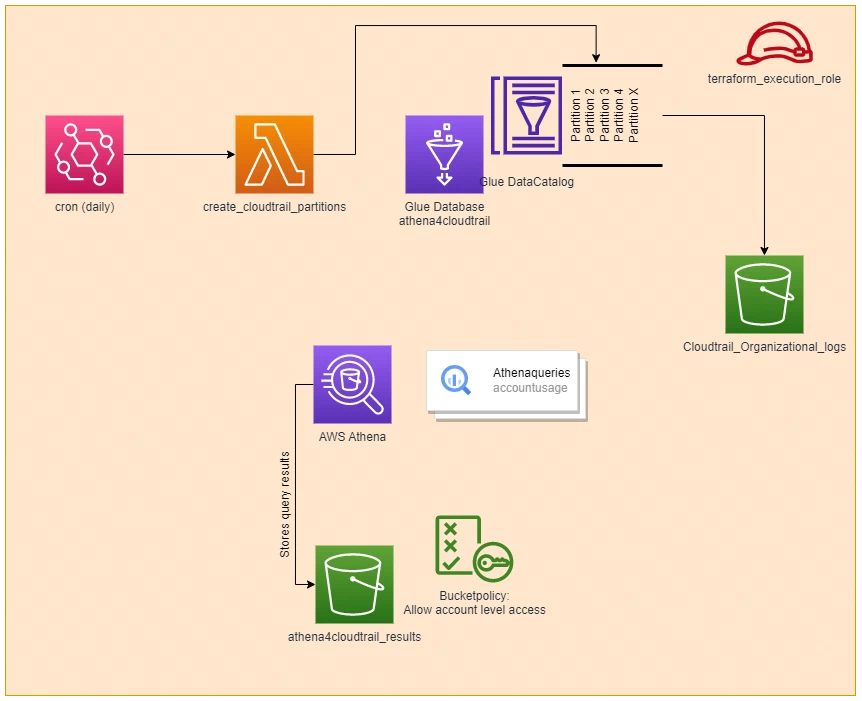
In fact, the design looks almost like the one from GorillaStack. In comparison, I´ve put a lot of time to make the lambda function more efficient. This is how I´ve optimized the lambda:
- Generate partitions with a Python generator (Generators - Python Wiki): A Python generator allows us to calculate needed partitions and only store “current” partitions in the memory. This makes the whole solution scalable as I only create a bunch of partitions at a time. I only fetch S3 to get all account IDs and create the partitions ad hoc. Now my lambda can run without any problems with 128MB of memory.
- Reduce the number of partitions: All other solutions are creating partitions of all regions in AWS. I´ve locked a lot of regions via ControlTower which means I do not care what runs there. If you look into the cloud trail data you will most likely find out that the IAM Access Analyzer creates some logs over time. I have reduced the number of partitions drastically by only applying regions of my interest. The region information is also part of the generator class in (1)
- Implement retention: With retention, we can clean up old partitions which aren´t needed anymore. This reduces again the number of partitions and ensures that we have a stable query performance in Athena.
- Implemented additional features: I´ve decided to create my own workspace for my Athena solution which also contains pre-shipped queries. In addition, I´ve changed the partition type for year/month/day from “string” to “number” which enables us to make use of “<” and “>” operators in our call. This wasn´t the case in the previous solutions and somehow felt strange to query numbers as “strings”.
During the development, I found out that some business logic of glue is not really intentional:
If you query glue with the get_partitions API and an expression AWS will scan all partitions first and then applies the filter. I´ve used a paginator to go over the get_partitions API result and found out that it took forever. I had to increase the page size to a max value of 1000 in order to have a proper performance for my retention.
If you are interested in more information about the solution feel free to contact me via social media or my blog website. I am open to a conversation :)
Peek View:
This is a sample implementation of a partition generator function:
from collections.abc import Generator
from datetime import datetime, timedelta

class PartitionGenerator(Generator):
    """ A generator class which generates batches of Partitions for cloudtrail organizational logs

        Parameters
        -------
        accounts : list(str)
        regions: list(str)
        startdate: datetime
        days_to_add: int
        page_size: int

        Returns
        -------
        partitions : list(account: str, region: str, year: int, month: int, day: int)
            Returns the next batch of length page_size for further processing

        Raises
        ------
        StopIteration

    """
    def __init__(self, accounts:list, regions:list, startdate: datetime, days_to_add: int, page_size: int):
        self.accounts = accounts
        self.regions = regions
        self.startdate = startdate
        self.enddate = startdate + timedelta(days=days_to_add)
        self.current = {
            'account': accounts[0],
            'region': regions[0],
            'date':startdate
        }
        self.pagesize = page_size
        self.accounts_processed = False

    def _update_current_partition(self, next_region_index, next_account_index) -> None:
        self.current['date']=self.startdate
        self.current = {
            'account': self.accounts[next_account_index],
            'region': self.regions[next_region_index],
            'date':self.startdate
        }
        return

    def send(self, arg):
        partition_values = []
        next_account_index = 0
        next_region_index = 0

        if self.accounts_processed:
            raise StopIteration

        for account_index, account in enumerate(self.accounts):
            if self.current['account'] != account: # Used in subsequent calls: Only proceed if we´ve reached the current account
                continue
            next_account_index = account_index
            for region_index, region in enumerate(self.regions):
                if self.current['region'] != region:  # Used in subsequent calls: Only proceed if we´ve reached the current region
                    continue
                while(self.current['date']<self.enddate):
                    partition_values.append({'Values': [
                        self.current['account'],
                        self.current['region'],
                        f"{self.current['date'].year}",
                        f"{self.current['date'].month:02d}",
                        f"{self.current['date'].day:02d}"
                        ]})
                    self.current['date']=self.current['date'] + timedelta(days=1)
                    if (self.current['date']>=self.enddate): # Datetime is out of range - move to next region and account (if necessary)
                        next_region_index = (region_index + 1) % len(self.regions)
                        if next_region_index == 0:
                            next_account_index = (account_index + 1) % len(self.accounts)
                            if next_account_index == 0:
                                self.accounts_processed = True
                        self._update_current_partition(
                            next_region_index,
                            next_account_index
                            )
                        if(len(partition_values) == self.pagesize):
                            return partition_values
                        break

                    if(len(partition_values) == self.pagesize):
                        return partition_values
            else:
                continue
            break

        self.accounts_processed = True
        if len(partition_values) > 0:
            return partition_values

    def throw(self, type, value=None, traceback=None):
        super().throw(type, value, traceback)
And of course the unit tests:
import sys
import os
sys.path.insert(0, os.path.abspath(os.path.join(os.path.dirname(__file__), '../src')))
import boto3
import unittest
import random
from datetime import datetime, timedelta
from utils.partition_value_generator import PartitionGenerator


class TestPartitionValueGenerator(unittest.TestCase):
    @staticmethod
    def generate_example_partition_arguments() -> dict:
        # expected samples: 500
        return {
            'accounts':['123456789123','123456789124','123456789125','123456789126','123456789127'],
            'regions':['us-east-1','us-east-2','us-west-1','us-west-2','eu-west-1'],
            'startdate':datetime.today(),
            'days_to_add':20,
            'page_size':1
        }

    @staticmethod
    def get_random_partition_value_from_example() -> list:
        # returns one sample of the list of example partitions generated vai generate_example_partition_arguments
        account = random.choice(['123456789123','123456789124','123456789125','123456789126','123456789127'])
        region = random.choice(['us-east-1','us-east-2','us-west-1','us-west-2','eu-west-1'])
        date = datetime.today() + timedelta(days = random.choice(range(0,20)))
        return [
            account,
            region,
            str(date.year),
            f'{date.month:02d}',
            f'{date.day:02d}'
            ]

    @staticmethod
    def generate_random_partition_arguments() -> dict:
        all_regions = [
            'us-east-1',
            'us-east-2',
            'us-west-1',
            'us-west-2',
            'eu-west-1',
            'eu-central-1',
            'ap-northeast-1',
            'ap-northeast-2',
            'ap-southeast-1',
            'ap-southeast-2',
            'ap-south-1',
            'sa-east-1'
            ]
        regions = random.sample(all_regions, random.randint(1,len(all_regions)))
        accounts = []
        for _ in range(random.randint(1,20)):
            random_account_id = ''.join(str(random.randint(0,9)) for _ in range(12))
            accounts.append(random_account_id)
        startdate = datetime.today()
        days_to_add = random.randint(1,10)
        page_size = 1
        return {
            'accounts':accounts,
            'regions':regions,
            'startdate':startdate,
            'days_to_add':days_to_add,
            'page_size':page_size
        }

    def test_partition_value_count(self) -> None:
        arguments = self.generate_random_partition_arguments()
        partition_generator = PartitionGenerator(**arguments)
        expected_count = len(arguments['accounts']) * len(arguments['regions']) * arguments['days_to_add']

        count = len([partition for partition in partition_generator])

        self.assertEqual(
            expected_count,
            count,
            f'Partitioncount {count} doesn´t match for random generated partion request {arguments}'
            )

    def test_partition_pagesize(self) -> None:
        arguments = self.generate_example_partition_arguments()
        arguments['page_size'] = random.choice([5,10,25,50,100])
        partition_generator = PartitionGenerator(**arguments)

        count = 0
        for partition_batch in partition_generator:
            self.assertEqual(
                arguments['page_size'],
                len(partition_batch),
                f'Partition pagesize {len(partition_batch)} is not correct'
            )
            count = count + arguments['page_size']
        self.assertEqual(
            500,
            count,
            f'Partitioncount {count} doesn´t match for random generated partion request {arguments}'
            )

    def test_partition_content(self) -> None:
        arguments = self.generate_example_partition_arguments()
        arguments['page_size'] = 500
        partition_generator = PartitionGenerator(**arguments)
        partitions = []

        for partition_batch in partition_generator:
            partitions.extend(partition_batch)

        for _ in range(10):
            random_partition = self.get_random_partition_value_from_example()
            partition_filtered = next((partition for partition in partitions if partition['Values']==random_partition), None)
            self.assertIsNotNone(
                partition_filtered,
                f'Partion {random_partition} not found in result.')

unittest.main()