Table of Contents
- What AWS Config records
- Recording modes: The key to controlling cost
- Config evaluations: A separate cost dimension
- Storing Config data on S3
- Setting up Athena for Config analysis
- Understanding Config cost in Cost Explorer
- Deep dive: How SecurityHub control updates silently increase your bill
- Lessons learned and recommendations
- What I expect from AWS
AWS Config is one of those services that silently accumulates cost in the background. You enable it once, forget about it, and months later wonder why your bill includes a line item you never consciously triggered. In this post, I’ll explain how AWS Config billing actually works, what recording options you have, and how to set up an analysis backend that lets you investigate cost spikes efficiently. Then I’ll walk through a real-world investigation where I traced unexpected Config charges back to AWS-initiated changes - something that caught me completely off guard.
What AWS Config records
AWS Config continuously tracks the configuration state of your AWS resources. When a resource is created, modified, or deleted, Config captures a snapshot of its configuration and stores it as a configuration item (CI). This gives you a historical record of how your environment evolved over time - useful for compliance audits, change tracking, and troubleshooting.
However, it’s important to understand that Config does not record everything. The AWS Config supported resource types documentation lists which resource types are supported and what attributes are captured for each. Not all resource parameters are logged, and not all resource types are covered. This is not a mirror of what you can deploy via CloudFormation - it’s a curated subset focused on compliance-relevant attributes.
For enterprise environments with multiple accounts, you can use aggregated queries through a Config Aggregator to get a consolidated view across your organization. This is often sufficient for basic inventory and compliance reporting. But when you need to analyze cost patterns or investigate anomalies, you’ll need a more flexible backend - which is where Athena comes in.
Recording modes: The key to controlling cost
When you enable Config recording for a resource type, you have three options that directly impact your bill:
| Mode | Behavior | Cost | Best for |
|---|---|---|---|
| Continuous | Records a CI every time the resource changes | 0.003 USD per CI | Resources requiring full change audit trail |
| Periodic | Checks once per day, records only if changed | Higher per CI, but max 1/day | High-churn resources where daily snapshots suffice |
| Exclusion | No recording at all | Free | Non-compliance-relevant or noisy resource types |
The recording mode is configured per resource type in your Config recorder settings. I recommend reviewing your recording scope periodically - especially for resource types with high change frequency like AWS::EC2::NetworkInterface.
Config evaluations: A separate cost dimension
Beyond recording configuration items, AWS Config can also evaluate resources against rules. This is where Config Rules and SecurityHub controls come into play.
Important distinction:
- Config Rule evaluations (custom rules or AWS managed rules) are billed at 0.001 USD per evaluation
- SecurityHub control evaluations are free - AWS does not charge for rule evaluations triggered by SecurityHub
This means if you’re using SecurityHub for compliance checks, you’re not paying for the rule evaluation itself. However - and this is a critical point I’ll cover later - you are still paying for the configuration items that track the compliance state of your resources. This subtle distinction can lead to unexpected cost.
Storing Config data on S3
By default, Config stores configuration items in an internal data store that you can query through the Config console or API. For large-scale analysis, I recommend enabling S3 delivery to export your Config data to a bucket you control.
When you configure S3 delivery, you get two types of exports:
| Export Type | What it contains | When to use |
|---|---|---|
| Snapshots | Point-in-time inventory of all recorded resources | “What did my environment look like on date X?” |
| History | Continuous stream of configuration changes | “What changed on date X and why?” |
S3 path patterns:
Snapshots: s3://{bucket}/AWSLogs/{account_id}/Config/{region}/{year}/{month}/{day}/ConfigSnapshot/
History:   s3://{bucket}/AWSLogs/{account_id}/Config/{region}/{year}/{month}/{day}/ConfigHistory/
I recommend scheduling daily snapshots to maintain a baseline inventory. For cost investigations, the history data is typically more valuable because it shows you exactly which resources generated configuration items.
Setting up Athena for Config analysis
Once your Config data lands in S3, you can query it directly with Athena. This is where you gain the flexibility to slice and dice your data in ways the Config console doesn’t support.
Table structure
You’ll need two Glue tables - one for snapshots, one for history. Both follow the same schema but point to different S3 paths. The key columns you’ll work with:
configurationitemcapturetime- when the CI was recordedresourcetype- the AWS resource type (e.g.,AWS::Lambda::Function)resourceid- the unique identifier of the resourceconfigurationitemstatus-ResourceDiscovered,OK, orResourceDeletedconfiguration- JSON blob with the actual resource configurationawsaccountid- the account where the resource lives
Partition projection
For organizations with many accounts, I strongly recommend using Athena partition projection rather than manually managing partitions. Partition projection lets Athena infer partition values from the S3 path structure without needing a Glue crawler or explicit partition registration.
A typical setup partitions by:
dt(date) - using a date range projection from your earliest data toNOWaccount_id- using an enum projection with your account IDsregion- using an enum projection with your active regions
The account list will change as you onboard or offboard accounts. A simple Lambda function triggered on a schedule can update the account_id projection values by listing your organization’s accounts and updating the Glue table parameters. This keeps your Athena setup maintenance-free.
Views for convenience
Raw Config data comes as nested JSON arrays. I recommend creating views that unnest the configurationItems array so you can query individual resources directly.
View for Config history (changes):
CREATE OR REPLACE VIEW config_logs_history_flat AS
SELECT
    dt,
    item.configurationitemcapturetime,
    item.awsaccountid,
    item.configurationitemstatus,
    item.resourcetype,
    item.resourceid,
    item.configuration
FROM
    config_logs_history
CROSS JOIN
    UNNEST(configurationitems) AS t(item);
View for Config snapshots (point-in-time inventory):
CREATE OR REPLACE VIEW config_logs_snapshots_latest AS
SELECT
    s.fileversion,
    s.configsnapshotid,
    s.region,
    s.dt,
    item.configurationitemversion,
    item.configurationitemcapturetime,
    item.configurationstateid,
    item.awsaccountid,
    item.configurationitemstatus,
    item.resourcetype,
    item.resourceid,
    item.resourcename,
    item.arn,
    item.awsregion,
    item.availabilityzone,
    item.configurationstatemd5hash,
    item.configuration,
    item.supplementaryconfiguration,
    item.tags,
    item.resourcecreationtime
FROM
    config_logs_snapshots s
CROSS JOIN
    UNNEST(s.configurationitems) AS t(item)
WHERE
    date_parse(s.dt, '%Y/%c/%e') = (
        SELECT MAX(date_parse(dt, '%Y/%c/%e'))
        FROM config_logs_snapshots
        WHERE date_parse(dt, '%Y/%c/%e') <= CURRENT_DATE
    );
The snapshot view includes a subquery to automatically select the latest available snapshot date, making it easy to query your current inventory without specifying dates manually.
These flattened views make subsequent queries much simpler.
Understanding Config cost in Cost Explorer
Before diving into Athena queries, start your investigation in Cost Explorer. The key is to filter by the right dimension.
Step 1: Filter by usage type
In Cost Explorer, group your costs by Usage Type. Look for usage types matching the pattern:
{region}-ConfigurationItemRecorded- cost from recording configuration items{region}-ConfigRuleEvaluations- cost from Config rule evaluations
For example, EUC1-ConfigurationItemRecorded represents configuration item recordings in eu-central-1.
In most environments, configuration item recordings dominate the Config cost. Rule evaluations are typically a smaller component - especially if you’re using SecurityHub (which doesn’t charge for evaluations).
Step 2: Understand what drives CI cost
A common misconception is that you pay once per resource in Config. The reality is more nuanced:
You pay for:
- The initial recording when a resource is discovered
- Every subsequent change to that resource’s configuration
- The recording when a resource is deleted
This means a single EC2 instance that gets modified 10 times in a month generates 10+ configuration items (discovery + 10 changes). High-churn resources like Auto Scaling groups, Lambda functions, or frequently-updated IAM policies can generate significant CI volume.
Additionally - and this surprised me during my investigation - there’s a shadow resource type called AWS::Config::ResourceCompliance that tracks the compliance state of each resource. Every time the set of Config rules affecting a resource changes, or when a compliance evaluation flips, this ResourceCompliance item gets updated. And yes, you pay for those updates too.
Step 3: Use Athena for root cause analysis
Once you’ve identified a cost spike in Cost Explorer, switch to Athena for the deep dive. Typical questions you can answer:
- Which resource types generated the most configuration items on a given day?
- Which accounts are driving the highest CI volume?
- What changed on a specific resource that triggered a CI?
- Are there patterns in the timing of changes (e.g., automated processes)?
Let me now walk through a real investigation where this approach paid off.
Deep dive: How SecurityHub control updates silently increase your bill
This section documents a real-world finding that caught me off guard: AWS is charging customers via Config for SecurityHub control updates and Lambda runtime upgrades - actions initiated entirely by AWS, not by the customer. I will walk you through my troubleshooting process step by step so you can reproduce the analysis in your own environment.
The observation
While monitoring cost anomalies across my AWS accounts, I observed unusual cost spikes related to the usage type EUC1-ConfigurationItemRecorded. The affected accounts showed significant Config-related cost in a region that was not actively used by the workloads deployed in those accounts. On May 5th alone, one test account generated almost 1 USD in Config charges for that single day.
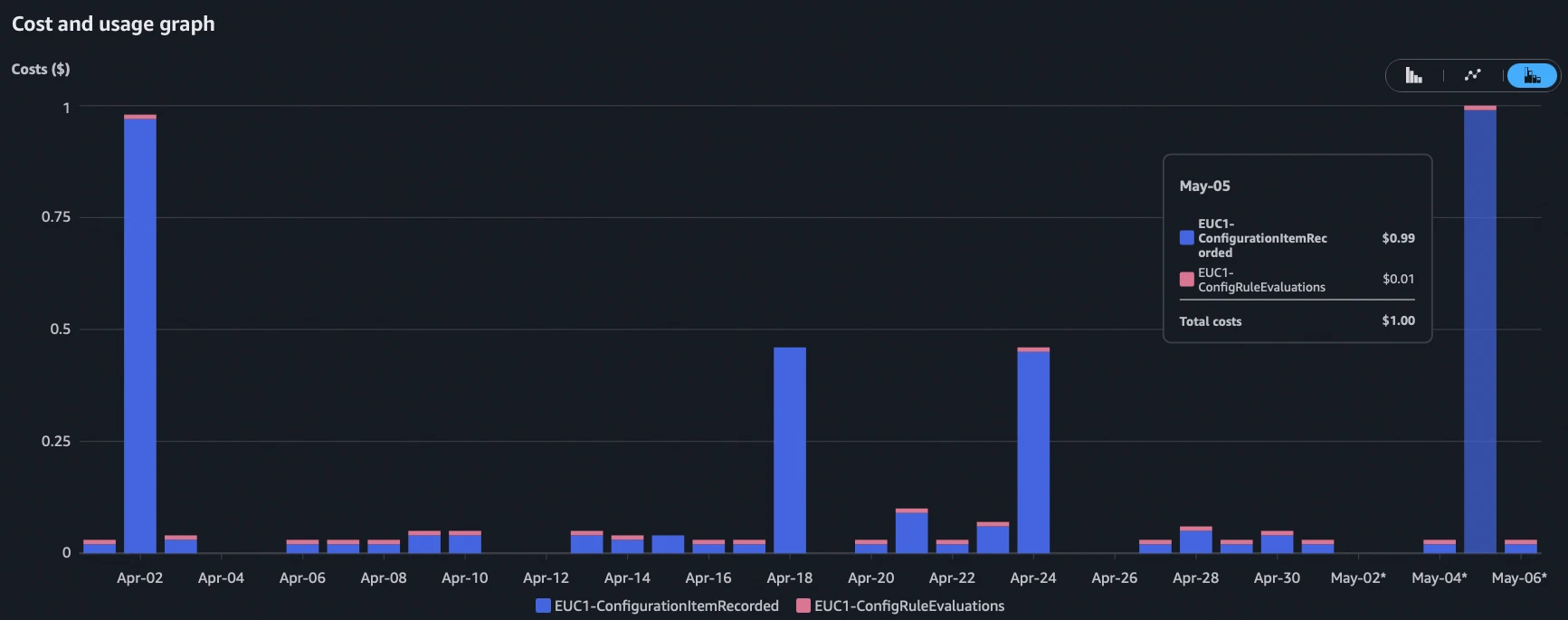
Now you may think: “1 USD? That’s nothing.” And you’re right - for a single account on a single day. But let me put this into perspective. At the official AWS Config price of 0.003 USD per configuration item, 1 USD translates to roughly 330 recorded items. For an account with no active customer workloads in that region, this is suspicious. More importantly: If this pattern repeats across hundreds of accounts, you’re talking about serious money. And as I found out, this is exactly what happens.
The first thing I checked was the split between rule evaluations and configuration item recordings. Rule evaluations were almost zero for this account in that region. This immediately shifted my focus away from Config rules being triggered by resource changes and towards configuration changes being recorded by the Config recorder itself. Something was changing - but what?
Understanding ResourceCompliance: The hidden cost multiplier
Before diving into the queries, let me explain something that isn’t well documented by AWS and that I only fully understood during this investigation.
AWS Config doesn’t just record configuration items for your actual resources (EC2 instances, Lambda functions, S3 buckets, etc.). It also maintains a shadow resource of type AWS::Config::ResourceCompliance for every resource that has at least one Config rule applied to it. This ResourceCompliance item keeps track of all Config rules evaluating a given resource and their compliance state.
Here’s the important part: Every time the set of Config rules for a resource type changes, the ResourceCompliance item for EACH affected resource gets updated. And each of those updates counts as a billable configuration item at 0.003 USD.
This means you are effectively paying for two configuration items per resource: the resource itself and its ResourceCompliance companion. Under normal operations, the ResourceCompliance item only changes when a rule evaluation flips between COMPLIANT and NON_COMPLIANT. But as I discovered, there are scenarios where AWS itself triggers mass updates to these items.
Troubleshooting: Finding the root cause
Step 1: Identify which resource types caused the spike
My first step was to break down the configuration changes by resource type. I used the following Athena query against my Config history data:
SELECT
    change_date,
    awsaccountid,
    resourcetype,
    region,
    COUNT(*) AS change_count,
    COUNT(DISTINCT resourceid) AS affected_resources,
    SUM(CASE WHEN configurationitemstatus = 'ResourceDiscovered' THEN 1 ELSE 0 END) AS new_resources,
    SUM(CASE WHEN configurationitemstatus = 'ResourceDeleted' THEN 1 ELSE 0 END) AS deleted_resources,
    SUM(CASE WHEN configurationitemstatus = 'OK' THEN 1 ELSE 0 END) AS modified_resources
FROM
    config_logs_history_by_daterange
WHERE
    dt = '2026/5/5'
    AND region = 'eu-central-1'
GROUP BY
    change_date,
    awsaccountid,
    region,
    resourcetype
HAVING
    COUNT(*) >= 10
ORDER BY
    change_date DESC,
    change_count DESC
;
The HAVING COUNT(*) >= 10 filter helps to focus on resource types with significant activity and filters out the noise of individual resource changes. The result was immediately clear:
| resourcetype | change_count | affected_resources | new_resources | deleted_resources | modified_resources |
|---|---|---|---|---|---|
| AWS::Config::ResourceCompliance | 322 | 161 | 0 | 0 | 322 |
| AWS::IAM::Policy | 15 | 15 | 0 | 0 | 15 |
The dominant contributor was AWS::Config::ResourceCompliance with 322 changes on 161 distinct resources. No resources were created or deleted - all 322 items were pure modifications. The math is interesting: 322 changes on 161 resources means exactly 2 changes per resource. This pattern already hinted at something being added and then removed.
Step 2: Check Config rule evaluations (side investigation)
Just out of curiosity - and because it’s a useful technique for your own troubleshooting - I also checked which Config rules were actually being invoked on that day. This query uses CloudTrail data to identify rule evaluations via the PutEvaluations API call:
SELECT
    json_extract_scalar(additionalEventData, '$.configRuleName') as configRuleName,
    count(*) as evaluationCount,
    awsRegion as region,
    timestamp
FROM "cloudtrail_logs_management_events"
WHERE
    eventSource = 'config.amazonaws.com'
    AND eventName = 'PutEvaluations'
    AND region = 'eu-central-1'
    AND timestamp = '2026/05/05'
GROUP BY
    1,3,4
ORDER BY
    evaluationCount DESC;
This query is very useful if you want to understand which Config rules are actually getting invoked in your environment. It gives you a complete picture of rule activity independent from the Config console. I recommend running it periodically to understand your rule evaluation cost drivers.
The top result was securityhub-lambda-function-settings-check-b25d7b79 with 160 evaluations. All other SecurityHub rules had only 1-2 evaluations (periodic checks). This single rule evaluated 160 resources in one go - which matched almost perfectly with the 161 distinct resources from the ResourceCompliance changes. A new SecurityHub control was clearly being rolled out.
Step 3: Drill into ResourceCompliance to understand the change
The next step was to look at the actual content of the ResourceCompliance configuration items. What exactly changed? I picked one affected resource and queried its full configuration history:
SELECT
    configurationitemcapturetime,
    configuration
FROM
    config_logs_history_by_daterange
WHERE
    dt = '2026/5/5'
    AND region = 'eu-central-1'
    AND resourceType = 'AWS::Config::ResourceCompliance'
    AND resourceid LIKE 'AWS::Lambda::Function/%'
LIMIT 10;
The configuration field is a JSON blob that contains the list of all Config rules applied to the target resource and their compliance state. Comparing the two snapshots for the same resource revealed the root cause:
Snapshot at 14:45 UTC - The ResourceCompliance item listed 3 config rules:
securityhub-lambda-function-public-access-prohibited-*securityhub-lambda-function-settings-check-b25d7b79(NEW version)securityhub-lambda-function-settings-check-bb30999a(OLD version)
Snapshot at 16:57 UTC - The ResourceCompliance item listed only 2 config rules:
securityhub-lambda-function-public-access-prohibited-*securityhub-lambda-function-settings-check-b25d7b79(NEW version only)
The pattern is now obvious: AWS performed a blue-green deployment of a SecurityHub control. The new version of the rule was deployed first (generating change #1 for each affected resource), and approximately 2 hours later the old version was removed (generating change #2 for each affected resource).
Step 4: Visual confirmation via the AWS Config Console
The Athena output with nested JSON was hard to read and I wanted visual confirmation. Switching to the AWS Config Console for the final verification made the picture crystal clear:
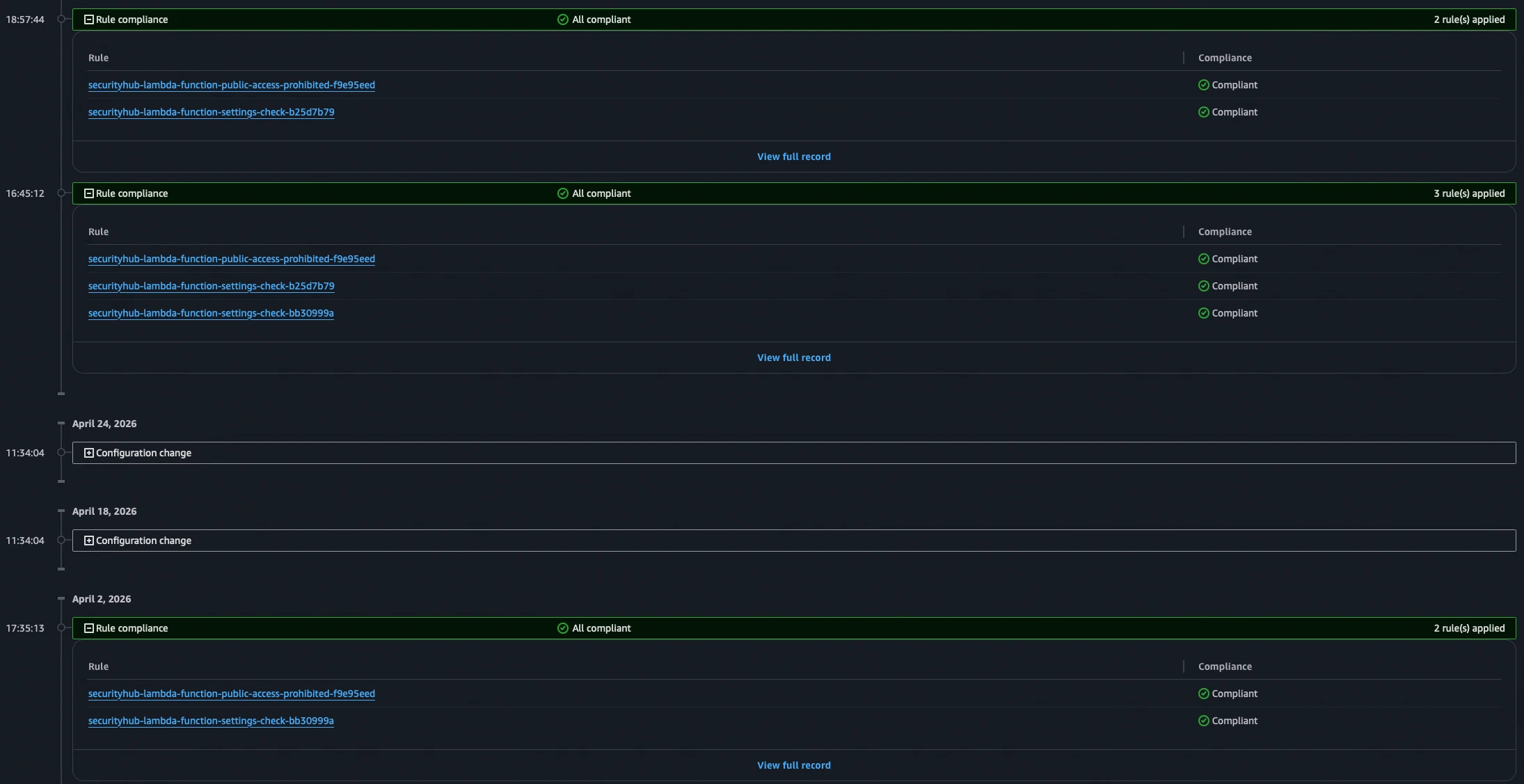
The Config timeline for the affected resource showed:
- The resource itself experienced no configuration changes on that day
- The ResourceCompliance timeline clearly showed the blue-green deployment: new rule added, old rule removed ~2 hours later
Looking one month back in the Config Console confirmed that this was a one-time control update event. The old rule version was no longer present and the new version was actively evaluating resources.
The cost math at organizational scale
Let me walk you through the cost calculation to illustrate why this matters at scale:
Per resource, per SecurityHub control rollout:
- 1 ResourceCompliance change when the new rule is added = 0.003 USD
- 1 ResourceCompliance change when the old rule is removed = 0.003 USD
- Total per resource: 0.006 USD
Note: SecurityHub rule evaluations are explicitly excluded from AWS Config billing, so you don’t pay for the rule evaluation itself - only for the ResourceCompliance configuration item changes.
At scale:
Let’s assume you have 500 accounts with an average of 300 resources of the affected type (in this case the control targeted a specific resource type, but it could be any resource type that a SecurityHub control covers). That’s 150,000 resources across your organization.
- 150,000 x 0.006 USD = ~900 USD per SecurityHub control rollout
And here’s the thing: You have no control over when AWS decides to update a SecurityHub control. You cannot prevent it, you cannot schedule it, and you cannot opt out of the resulting Config charges. The only notification you might get is a change in the SecurityHub control documentation - if you’re watching closely enough.
Bonus finding: Lambda runtime upgrades
During the same investigation, I stumbled upon another source of AWS-initiated Config changes. AWS periodically patches Lambda runtimes - for example, applying security updates to the underlying runtime environment. When this happens, the runtimeVersionArn attribute of the Lambda function configuration changes.
From the customer’s perspective: You didn’t touch your Lambda function. You didn’t deploy new code. You didn’t change any configuration. But AWS updated the runtime version internally, and this triggers:
- A configuration item recording for the
AWS::Lambda::Functionresource (0.003 USD) - A corresponding ResourceCompliance update if any rules are applied (0.003 USD)
For organizations with hundreds of Lambda functions across many accounts, a single runtime patching event generates significant cost. My estimated impact for a larger AWS environment: ~500 USD per Lambda runtime upgrade rollout.
Again - this is entirely outside of customer control. AWS decides when to patch runtimes, and you pay for the resulting Config recordings.
Lessons learned and recommendations
AWS Config charges you for changes you didn’t make: SecurityHub control rollouts and Lambda runtime patches are AWS-initiated actions that generate billable Config items in your account. There is no way to distinguish between customer-initiated and AWS-initiated changes in the billing.
ResourceCompliance is a hidden cost multiplier: Every resource tracked by Config has a shadow ResourceCompliance item. Any change to the set of Config rules affecting that resource type triggers a billable update to ALL ResourceCompliance items of that type. This is poorly documented and not obvious from the Config pricing page. If you’re using SecurityHub as your primary compliance tool and don’t have a specific need for ResourceCompliance data in Config, consider disabling recording for
AWS::Config::ResourceComplianceentirely - SecurityHub tracks compliance state changes independently via EventBridge and is not dependent on ResourceCompliance, so your findings will still work and you’ll avoid paying for these shadow items.Idle resources amplify the problem: Accounts with many resources that are not actively changing still accumulate Config cost when AWS performs background operations. Ironically, the accounts where you’d expect the lowest Config cost (idle/test accounts) can show the highest relative spikes.
Monitor your Config cost proactively: Use the usage type
ConfigurationItemRecorded(with your region prefix) in Cost Explorer as an early warning signal. Build Athena queries like the ones shown above to quickly identify the root cause of any spike.Regularly review your CI changes and recording modes: I recommend periodically analyzing which resource types generate the most configuration items in your environment. For high-churn resource types that don’t require real-time change tracking, consider switching from continuous to periodic recording - or excluding them entirely if they’re not compliance-relevant. This is especially important in environments with heavy automation:
- SSM Patch Manager: Patching operations can trigger multiple CI updates per instance
- EC2 Auto Scaling with Spot instances: Instance churn generates constant discovery/deletion CIs
- Automated deployments: CI/CD pipelines that frequently update Lambda functions or other resources
The cost savings from adjusting recording modes can be substantial in these scenarios.
Consider Config recording scope: If you don’t need ResourceCompliance tracking for certain resource types, evaluate whether excluding them from Config recording reduces your cost without impacting your compliance posture. However, be aware that this may affect SecurityHub findings visibility.
The Athena backend pays off: Without the ability to quickly query Config history data at scale, this investigation would have taken significantly longer. The combination of Config history exports and Athena gives you the forensic capability to understand exactly what happened and when.
What I expect from AWS
I believe that configuration changes initiated by AWS itself should not be billable to the customer. The customer has no control over when these rollouts happen and cannot prevent the resulting Config items from being recorded. This is a cost that scales linearly with the size of your environment and is entirely outside of customer control.
I have raised this with AWS Support. Regardless of the outcome, I hope this post helps you understand a hidden cost driver in your AWS environment and gives you the tools to investigate similar spikes on your own. If you’ve experienced the same issue - feel free to reach out to me on LinkedIn. The more customers raise this concern, the more likely AWS is to address it.